Saturday, March 25, 2017

One-part AVR-controlled "boost converter"

I built a crappy AVR-controlled boost converter with just one part (an inductor) that can blink a blue LED when you power it at 2.3 V. See the video here:

I did this because there was a challenge on a cool electronics blog that I follow.

The "boost converter" is pretty crappy because it does not produce a stedy voltage and it is only useful when the input voltage is between 2.3 V and 2.5 V. Below that, my AVR ATmega328P seems to stop running. Above that, the blue LED is on all the time (though it does get noticeably brighter when I run the boost).

In this system, VCC is only boosted by about 0.7 V; it can go a little bit higher if I use more I/O lines, but it can't go much higher than that because of the blue LED. If I take the blue LED away, I see shorter but more extreme boosts on VCC. With one I/O line, I see a boost of 1.2 V. With two I/O lines, I see a boost of 1.7 V, and it seems like the sudden boost causes issues for the AVR and it usually resets after one or two boosts. With three I/O lines, I see a very sharp boost of 2.0 V for 2 us, and it consistently causes the AVR to reset.

Update: I received a shirt from Josh for winning the contest. I like it!

The shirt is gray, has a picture of an inductor, and says: Winner! Josh.com Boost Converter Design Contest

Friday, October 21, 2016

GitHub.com hosts file

GitHub and other popular sites are suffering from a DDoS attack right now. In case you actually want to use GitHub, here are entries you can add to your system's hosts file:

192.30.253.113 github.com
103.245.222.133 assets-cdn.github.com

Just remember to remove these entries later once GitHub starts working again, since those IP addresses might change in the future without notice.

Wednesday, June 22, 2016

Detailed teardown of a Roomba Model 550 robot

I recently bought a Roomba for $5 from my neighbor at a garage sale. I tore it down in order to see what is going on inside it and learned a lot from it. Check out my detailed photo album on imgur.

Wednesday, February 24, 2016

Windows 32-bit structured exception handling example for GCC

I recently spent a few hours learning about structured exception handling (SEH) in 32-bit (i686) Microsoft Windows. The canonical article documenting this seems to be A Crash Course on the Depths of Win32™ Structured Exception Handling by Matt Pietrek in 1997.

After reading the first 1600 words of the article, I came across a code sample (Figure 3) that shows the most basic way one can use structured exception handling. The code uses C++ and a little bit of inline assembly to add its own exception handler to the beginning of the linked list of exception handlers that is stored in the Thread Environment Block. It then generates an segmentation fault (by writing to address 0) in order to demonstrate that the exception handler can run, fix the problem, and tell the OS to resume and try the problematic instruction again.

This example did not compile in my favorite C++ development environment for Windows, which is MSYS2. MSYS2 comes with a mingw-w64 GCC compiler. I don't know much about x86 assembly but I managed to port the example and get it to run. The main thing I had to change was the syntax of the inline assembly. Here is the code:


/* Basic demonstration of Win32 structured exception handling (SEH).

This code is based on Figure 3 (MYSEH.CPP) from this article:

    https://www.microsoft.com/msj/0197/exception/exception.aspx

Originally written by Matt Pietrek for the January 1997 Microsoft
Systems Journal.

Modified in 2016 by David E. Grayson to work with gcc.
*/

#include <windows.h>
#include <stdio.h>

DWORD scratch = 10;

EXCEPTION_DISPOSITION __cdecl
_except_handler(
    struct _EXCEPTION_RECORD * ExceptionRecord,
    void * EstablisherFrame,
    struct _CONTEXT * ContextRecord,
    void * DispatcherContext)
{
    // Indicate that we made it to our exception handler.
    printf("Hello from an exception handler\n");  fflush(stdout);

    // Change EAX in the context record so that it points to some
    // place where we can successfully write.
    ContextRecord->Eax = (DWORD_PTR)&scratch;

    // Tell the OS to restart the faulting instruction.
    return ExceptionContinueExecution;
}

int main()
{
    __asm__(                        // Build EXCEPTION_REGISTRATION record:
        "push    %0\n"              // Bytes 4 to 7: Address of handler function
        "push    %%fs:0\n"          // Bytes 0 to 3: Address of previous handler
        "movl    %%esp, %%fs:0\n"   // Install new EXECPTION_REGISTRATION
        :
        : "r" ((DWORD_PTR)_except_handler)
        );

    __asm__(
        "movl    $0, %eax\n"        // Zero out EAX
        "movl    $1, (%eax)\n"      // Write to EAX to deliberately cause a fault
        );

    printf("After writing!\n"); fflush(stdout);

    __asm__(                        // Remove our EXCEPTION_REGISTRATION record
        "movl    (%esp), %eax\n"    // Get pointer to previous record
        "movl    %eax, %fs:0\n"     // Install previous record
        "addl    $8, %esp\n"        // Clean our EXCEPTION_REGISTRATION off stack
        );

    printf("scratch = %d\n", scratch);

    return 0;
}

I compiled the code in a MinGW-w64 32-bit Shell, with /mingw32/bin/g++, using the command g++ -g3 -O0 myseh.cpp. When I run a.exe, the output is:

Hello from an exception handler
After writing!
scratch = 1

So this shows that our exception handler really did work!

Using less assembly

The code above worked, but I would not use it in production because it contains inline assembly that does sketchy things to the stack and registers without telling the compiler about it. We can make it a little bitter by using functions and structs provided by Windows headers to manipulate the thread environment block (which were probably not available in 1997 when Matt Pietrek wrote his article).


/* Basic demonstration of Win32 structured exception handling (SEH).

This code is based on Figure 3 (MYSEH.CPP) from this article:

    https://www.microsoft.com/msj/0197/exception/exception.aspx

Originally written by Matt Pietrek for the January 1997 Microsoft
Systems Journal.

Modified in 2016 by David E. Grayson to work with gcc and use less assembly.
*/

#include <windows.h>
#include <winternl.h>
#include <stdio.h>

DWORD scratch = 10;

EXCEPTION_DISPOSITION __cdecl
_except_handler(
    struct _EXCEPTION_RECORD * ExceptionRecord,
    void * EstablisherFrame,
    struct _CONTEXT * ContextRecord,
    void * DispatcherContext)
{
    // Indicate that we made it to our exception handler.
    printf("Hello from an exception handler\n");  fflush(stdout);

    // Change EAX in the context record so that it points to some
    // place where we can successfully write.
    ContextRecord->Eax = (DWORD_PTR)&scratch;

    // Tell the OS to restart the faulting instruction.
    return ExceptionContinueExecution;
}

int main()
{
    NT_TIB * teb = (NT_TIB *)NtCurrentTeb();

    // Install our handler at the beginning of the list.
    EXCEPTION_REGISTRATION_RECORD reg;
    reg.prev = teb->ExceptionList;
    reg.handler = (PEXCEPTION_ROUTINE)_except_handler;
    teb->ExceptionList = &reg;

    __asm__(
        "movl $0, %%eax\n"        // Zero out EAX
        "movl $1, (%%eax)\n"      // Write to EAX to deliberately cause a fault
        ::: "memory", "eax"
        );

    printf("After writing!\n"); fflush(stdout);

    // Remove our handler from the list.
    teb->ExceptionList = reg.prev;

    printf("scratch = %d\n", scratch);

    return 0;
}

We have to use two casts in the code above. First, we cast the output of NtCurrentTeb() because the struct type it points to by default is not very useful and just has a lot of fields with names like Reserved1. Second, we cast _except_handler because there is a disagreement about whether the exception handler should use the __cdecl calling convention or __stdcall. Both calling conventions seem to work, but since the calling convention of our _except_handler function does not match the calling convention of the handler member of the struct, we need to use a type-cast to satisfy the type-checking the GCC does at compile time. I have noticed cases like this in the past, where I had to change the calling convention of something to get it to compile with GCC, but presumably it would compile fine with the Microsoft C compiler. The function prototype of _except_handler in Microsoft's headers uses __cdecl, while the type definition of EXCEPTION_ROUTINE uses NTAPI, which means __stdcall.

What about 64-bit?

Apparently structured exception handling for 64-bit Windows is done in a totally different way, so you can't easily adapt the code above to work in 64-bit mode. More info about x64 Structured Exception Handling is available from OSR Online.

What's the point?

Microsoft's C compiler emits code similar to what I have above when you use the __try, __except, and __finally keywords. GCC does not yet support these keywords, but Clang has partial support for them. I have heard (but not verified) that WebKit uses SEH, so if we want to compile WebKit with GCC, someone needs to add SEH to GCC first. Or maybe we could compile WebKit but we would have to somewhat disable its sandboxing features. I haven't actually tried to compile WebKit with GCC yet.

Friday, October 9, 2015

Tuesday, June 2, 2015

USB CDC ACM braindump

I just dumped a lot of stuff I know about USB CDC ACM devices into a StackOverflow answer. Check it out if you want to learn more about the standard way to make a USB device that has a virtual serial port.

Friday, May 29, 2015

Ways to return a string from a C function

I am working on a C library and I need to have a flexible, easy, efficient way to return strings to the user. See my gist on this topic: https://gist.github.com/DavidEGrayson/db13d38cbe5c95db64c4.

Monday, March 2, 2015

Non-bitcoin assets on the block chain are not interesting

I frequently hear people in the Bitcoin community say that money is just the first application of the Bitcoin block chain, and that they want to use it for tracking other assets like land and securities. That thinking is misguided and I would like to explain why.

First of all, let's talk about the data in the block chain. The payload data for the block chain is mainly just a bunch of blobs of structured binary data called transactions. Each transaction has a list of inputs and a list of outputs, and it specifies how much value is stored inside each output. The value inside each output is just a positive integer which represents how many bitcoins are in that output. Each transaction output also has a script which determines who can unlock the output, and the typical script will contain something called a Bitcoin address. The rest of the data in the block chain, and all the software that runs on the nodes in the Bitcoin network, is designed to fulfill one purpose: it establishes a decentralized consensus on the set of unspent transaction outputs. It does this in a way that anyone can use the network, but nearly no one can modify its data maliciously.

The block chain, and the servers that maintain it, know nothing about real estate or stocks. So when someone tells you they have developed a way to represent non-bitcoin assets on the block chain, what they are saying is that they have invented a set of rules for how to interpret the data in the block chain in order to add extra information to it about asset ownership.

These rules that they invented are not enforced in the block chain. Therefore, if you are an owner of a non-bitcoin block chain asset, then you have to trust some third party to actually give value to your asset. That third party could arbitrarily change the rules of the game some day and declare that your assets are not valid, in a very similar manner to how PayPal or Coinbase can arbitrarily freeze your account. The block chain doesn't care, so the only recourse you would have is to complain loudly in public and/or file a lawsuit. There is nothing you can actually do by yourself in order to maintain control of that asset. Therefore, that kind of asset is inferior to an actual, real bitcoin, and it is not a particularly interesting thing to talk about.

The only benefit I can see to these kind of schemes is that there would be more transparency in the ownership and transfer of these assets. But you don't need the block chain to achieve that. Imagine this alternative system instead: the central authority that everyone is trusting could simply maintain a centralized ledger themselves. They could publish a new version of the ledger on their website every hour, signed with their company's PGP key. The asset holders could use ECDSA cryptography, or any kind of authentication mechanism that the company implements, in order to authenticate themselves and issue orders for transferring the asset. This kind of system is totally possible with today's technology, and it would be cheaper to implement than a block chain-based system because you wouldn't have to download tens of gigabytes of data or pay fees to Bitcoin miners.

So why does everyone keep talking about non-bitcoin assets on the block chain and writing software and protocols for it? There are people who have spent a lot more time thinking about this than I have, so maybe I am missing something. Please enlighten me in the comments.

TLDR: The bitcoin network establishes a decentralized consensus on the set of unspent transaction outputs. It doesn't know anything about non-bitcoin assets, so you'd have to trust a third party in order to actually hold such an asset. If you are trusting a third party, there is no real reason to use the block chain.

Sunday, February 15, 2015

Ruby blocks with brackets are parsed differently

In Ruby, you can write blocks using either brackets or with the do/end keywords. Check out this code that gives surprising results:


a = []
 
a.concat a.map { |b| }  # => []
 
a.concat a.map do |b|
end
# => no implicit conversion of Enumerator into Array (TypeError)

It turns out that the Ruby parser actually cares which notation you use for your blocks, and that affects which method will receive the block. In the code above, a block written with brackets gets passed to the last method in the statement. A block written with do/end gets passed to the first method, which causes the code example above to break.

You can even use both types of blocks in the same statement, and they go to different methods:


def f(x)
  puts 'f got block' if block_given?
end
 
def g(x)
  puts 'g got block' if block_given?
end
 
def h
  puts 'h got block' if block_given?
end
 
f g h { } do
end
# f got block
# h got block

I used to think that the different notations for blocks were just equivalent ways of writing the same thing, and I said that do/end should be used if and only if the block is multi-line. Now it seems like there might be legitimate reasons to break that rule, or to come up with a different rule.

Monday, September 22, 2014

Introducing RPicSim

Check out the post I recently wrote on the Pololu blog: Introducing RPicSim. It talks about a tool we made for using Ruby, RSpec, and test-driven development to aid the development of PIC microcontroller firmware.

Friday, July 11, 2014

Version 2.0.0 of minimu9-ahrs released

This week I released version 2.0.0 of minimu9-ahrs, which adds support for the MinIMU-9 v3. You can see more information on the Pololu blog.

Sunday, April 6, 2014

Introducing the Ruby ECDSA gem

I am happy to announce that I released version 1.0.0 of the Ruby ecdsa gem today. ECDSA stands for Elliptic Curve Digital Signature Algorithm. This algorithm, defined in a document called SEC1, allows you to make secure, cryptographic digital signatures of messages. The ecdsa gem is an implementation of ECDSA written almost entirely in pure Ruby.

To install the gem, run:

gem install ecdsa

One of the main purposes of the ecdsa gem is education; it is a good resource for people who want to learn about ECDSA. The ecdsa gem seems to be a lot slower than OpenSSL, but that is okay. Verifying a single secp256k1 signature with the gem takes about 280 ms on my machine.

The main reason that I made the ecdsa gem is because I wanted to do some experiments related to Bitcoin. My language of choice for experimentation is Ruby. Ruby has built-in support for ECDSA through its OpenSSL binding, but I found it frustrating to use.

Comparison to OpenSSL

Ruby's built-in OpenSSL ECDSA support is frustrating mainly because the documentation is very sparse. For example, it says on this page that you can create a new OpenSSL::PKey::EC::Point object from a "group" and a "bn". The group part is easy to figure out, but the "bn" part is not obvious at all. The "bn" stands for "big number". In general, a point can be created from a private key, which is a big number, so I would think that the "bn" argument might be the private key. Instead, the "bn" turns out to actually be a binary representation of the two coordinates of the public key, as defined in section 2.3.4 of SEC1. There was no way to figure this out from the Ruby documentation or the OpenSSL documentation; I had to do an experiment to verify it after someone on StackOverflow explained it to me.

In contrast, the Ruby ecdsa gem documentation explains the types of all its parameters and cites official documents when appropriate. Also, the classes and routines for doing cryptography are very clearly separated from the routines for encoding and decoding data from strings. All the binary formatting routines live in the ECDSA::Format module, and the parts of the gem that do actual cryptographic calculations do not depend on them.

Here is a bit of Ruby code showing how you would verify an ECDSA signature using OpenSSL and then again using the ECDSA gem:


digest =
  "\xbf\x91\xfb\x0b\x4f\x63\x33\x77\x4a\x02\x2b\xd3\x07\x8e\xd6\xcc" \
  "\xd1\x76\xee\x31\xed\x4f\xb3\xf9\xaf\xce\xb7\x2a\x37\xe7\x87\x86"

signature_der_string =
  "\x30\x45" \
  "\x02\x21\x00" \
  "\x83\x89\xdf\x45\xf0\x70\x3f\x39\xec\x8c\x1c\xc4\x2c\x13\x81\x0f" \
  "\xfc\xae\x14\x99\x5b\xb6\x48\x34\x02\x19\xe3\x53\xb6\x3b\x53\xeb" \
  "\x02\x20" \
  "\x09\xec\x65\xe1\xc1\xaa\xee\xc1\xfd\x33\x4c\x6b\x68\x4b\xde\x2b" \
  "\x3f\x57\x30\x60\xd5\xb7\x0c\x3a\x46\x72\x33\x26\xe4\xe8\xa4\xf1"

public_key_octet_string =
  "\x04" \
  "\xfc\x97\x02\x84\x78\x40\xaa\xf1\x95\xde\x84\x42\xeb\xec\xed\xf5" \
  "\xb0\x95\xcd\xbb\x9b\xc7\x16\xbd\xa9\x11\x09\x71\xb2\x8a\x49\xe0" \
  "\xea\xd8\x56\x4f\xf0\xdb\x22\x20\x9e\x03\x74\x78\x2c\x09\x3b\xb8" \
  "\x99\x69\x2d\x52\x4e\x9d\x6a\x69\x56\xe7\xc5\xec\xbc\xd6\x82\x84"

# Verifying with openssl.
require 'openssl'
ec = OpenSSL::PKey::EC.new('secp256k1')
key_bn = OpenSSL::BN.new(public_key_octet_string, 2)  # 2 means binary
ec.public_key = OpenSSL::PKey::EC::Point.new(ec.group, key_bn)
result = ec.dsa_verify_asn1(digest, signature_der_string)
puts result  # => true

# Verifying with the new ecdsa gem, version 1.0.0.
require 'ecdsa'
group = ECDSA::Group::Secp256k1
point = ECDSA::Format::PointOctetString.decode(public_key_octet_string, group)
signature = ECDSA::Format::SignatureDerString.decode(signature_der_string)
result = ECDSA.valid_signature?(point, digest, signature)
puts result  # => true

As you can see above, OpenSSL requires you to make this weird OpenSSL::PKey::EC object which represents an elliptic curve but it also holds a reference to a public key, which is a point on the curve. The object is weird because you cannot say concisely what it really is using the vocabulary of the problem domain, which is ECDSA. In contrast, the ecdsa gem uses the ECDSA::Group class to represent elliptic curves and the ECDSA::Point class to represent points on those curves.

You will also see that OpenSSL's verification method takes an ASN1 string directly, instead of taking a more abstract object that represents a signature. As a result, it is not easy for the user to inspect the internal structure of that signature, which actually consists of two big numbers. In contrast, the ecdsa gem takes a ECDSA::Signature object, so you are not forced to use any particular binary format to represent the signature and it is easier to see what is going on.

Thursday, January 30, 2014

What Ruby does at parse time

Yesterday at the Las Vegas Ruby Group, someone was surprised that Kernel#global_variables will list global variables that have not been used yet. The same thing is actually true for symbols and methods, as shown here:


p Symbol.all_symbols.map(&:to_s).grep(/neve/)
    # => ["never", "never_runs", "$never_global", "never_sym"]

p global_variables.grep(/neve/)  # => ["$never_global"]

def never_runs
  $never_global
  :never_sym
end

The first line of this program tells us that Ruby has already found four things. It found a symbol :never which apparently comes from the Ruby interpreter since we never defined it. It has found the name of the method in our program even though we haven't defined that method yet. It found a symbol we used in that method even though we are never going to call the method. Similarly, it found a the name of a global variable we were never going to use.

The second line just reproduces the original thing that happened at the Ruby group, and shows that Ruby is aware of "$never_global" as an actual global variable and not just a symbol.

To understand this, you need to know that Ruby does not simply run a source file one line at a time:

  • First, Ruby parses the syntax of all the code in the file.

  • Later, Ruby runs the code in the file.

We already intuitively know this because whenever we make a syntax error in a file, we can see that Ruby just reports a syntax error and does not run any of the other code in the file. This means it is parsing the entire file before running any of it.

So it shouldn't be surprising that the Ruby interpreter is aware of symbols and global variables before they are used; it just tells us that those things are probably recorded at parse time instead of run time. Some more evidence for this conclusion can be found in the fact that the Ruby interpreter has lots of symbol table code in parse.y.

Most of the time you can just pretend that Ruby processes your file one line at a time, but this is a case where the details of its behavior reveal a little bit about how it actually works.

The code in this blog post was executed with Ruby 2.0.0. Ruby 1.8.7 had the same results except the symbol "never" was not present.

Saturday, November 30, 2013

Running JRuby under JDB in Windows

I am working on some JRuby code that calls third-party Java libraries. The Java libraries were behaving oddly so I wanted to run them under JDB, the Java Debugger, so I can step through them line by line and inspect important values.

In Linux and Mac OS X, I think you should be able to do this by passing the --jdb option to JRuby when you run it. In Windows, JRuby does not support that option, but I was able to figure out how to do it anyway. Here is the command I used:

"C:/Program Files/Java/jdk1.7.0_45/bin/jdb.exe" -classpath "C:/jruby-1.7.4/lib/jruby.jar" -Djruby.home="C:/jruby-1.7.4" org.jruby.Main

The -classpath argument to JDB allows it to find the jruby.jar file, which defines jruby's org.jruby.Main class, which is the class to start if you want to use JRuby. The -Djruby.home option is recognized by JRuby and allows it to find its libraries and gems. If you want to pass any arguments to JRuby, then you can add them on to the end of this command, after org.jruby.Main. For my situation, I wanted to run RSpec so I added -S rspec:

"C:/Program Files/Java/jdk1.7.0_45/bin/jdb.exe" -classpath "C:/jruby-1.7.4/lib/jruby.jar" -Djruby.home="C:/jruby-1.7.4" org.jruby.Main -S rspec

Once you have started JDB successfully, you should see a message like "Initializing jdb ..." and a command prompt on the next line. My basic workflow is that I would figure out what class and method I want to inspect, and then I would add a breakpoint for it by running a command like this:

stop in com.example.namespace.ExampleClass.exampleMethod

Then run the run command. The JRuby and Java code will run until the specified breakpoint is hit, at which point the debugger will stop and let you interact with it again. Here are some more common commands I use:

  • where prints a full stack trace. These tend to be very long because of the internals of JRuby but if you scroll to the top you can see what part of the Java code you are in.
  • step advances to the next line of code, stepping into method calls if they are present.
  • next advances to the next line of code, skipping any method calls that might be present.
  • print EXPR evaluates the Java expression EXPR and prints the result. For example, if there is a local variable named "foo" you can type print foo to see its value.
This works in both the normal Command Prompt that comes with Windows and also the Git Bash shell that comes with Git. There are a couple more things that would be nice to have:
  • It would be nice to have a JDB command that prints out the current filename, method name, and line number. You get this info whenever you run next or step, but sometimes that output ends up really far up in my buffer and I would like a way to quickly see that information again.
  • It would be nice to do this inside some kind of an graphical interface or IDE. Has anyone gotten that working?
By the way, I think JDB is only for debugging Java code. If you want to debug JRuby code there are other tools for that. One that worked for me is the ruby-debug gem, even though people claim it is not maintained.

Sunday, April 21, 2013

Unusable UI caused by the Windows Forms Anchor property and window size restrictions

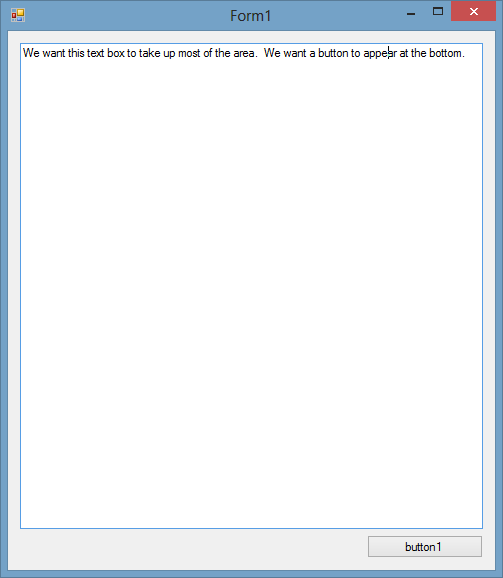
Suppose you make a Windows desktop application using Visual Studio 2012 Express for Desktop and you want to have a resizable window with a textbox that takes up most of the space and a button at the bottom of the window, as shown below:

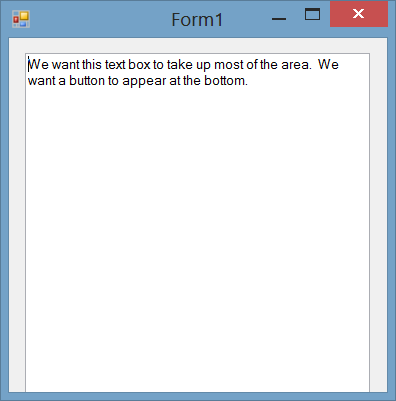
There are several ways to do this, but if you are not careful then a flaw in Windows Forms will cause some of your users to see an unusable UI where the button is missing, as shown below:

In this post I will document the flaw in Windows Forms and why it happens.

Here are the steps for reproducing the flaw:

  1. In the Control Panel, change the DPI setting to 100%. You can find this under Control Panel > Appearance and Personalization > Display > Change the size of all items, but you can get there faster if you just press the Windows key, type "dpi", and then do the proper keystrokes after that. If you are in Windows 8, you will need to select "Settings" after typing "dpi".
  2. In Visual Studio 2012 Express for Desktop, create a new Windows Forms Application. I used Visual C# but I expect the problem to happen in Visual C++ and Visual Basic too.
  3. Create a Button and position it in the lower-right corner of the form. Set the Anchor property of the button so that it anchors to the bottom and the right. This means that when the Window is resized, the button will move in order to keep two distances constant: the distance between the button's right edge and the window's right edge, and the distance between the button's bottom edge and the window's bottom edge.
  4. Optional: Create a TextBox that takes up the rest of the space on the forum. You will need to set its Multiline property to true, and set its Anchor property so that it anchors on all four sides. It will resize with the window.
  5. Resize the form so that it the form's height is about 100 pixels less than the height of your screen.
  6. Run the project and verify that everything behaves as expected. The entire textbox and button should be visible no matter how you resize the window.
  7. In the Control Panel again, change the DPI setting to 125%. You will have to log off for the change to take affect. You should notice that everything on your desktop appears bigger than it was before.
  8. Run the program that you built earlier. You should probably just find the executable that was built and run that directly instead of starting Visual Studio. The button will be missing.

So what is happening here? There are three features of .NET that are trying to adjust your window:

  1. Anchoring: The anchoring you set for you controls is trying to make certain distances constant. This is probably done in a SizeChanged event handler or something on the form.
  2. Auto-scaling: At startup, when this.ResumeLayout(false); is called in the InitializeComponent method, the Auto-scaling feature detects that the form was designed on a system with a different font size than the system on which the program is now running. This will resize the form and the things inside it.
  3. Window size limiting: Windows Forms does not let you have a window that is taller or wider than the user's screen.

It seems to me like the anchoring and auto-scaling work well together. At startup, the auto-scaling increases your window size to account for the larger font on the user's computer, and expands the window and controls appropriately. However, when the window size limiting procedure runs, it notices that your window is taller than the screen, so it changes the height of the window. Unfortunately, something must be wrong because the anchoring rules do not get applied when the height is decreased. This leaves your button and part of the text box invisible because they are below the bottom edge of the form. This all happens when your application starts up and resizing the window afterward does not help.

This really seems like a bug in the .NET Framework's Windows Forms, and I hope that Microsoft will fix it in the next version. I cannot think of a reason why they would want the anchoring rules to not be applied after the window size limitations are applied.

I tested this at 150% DPI and the problem did not happen.

Summary of the flaw

At startup, if your Windows form gets expanded by auto-scaling to size larger than the user's screen, it will get resized to fit on the screen. Unfortunately, the anchoring rules are not applied after that last resize. If your window's height got decreased, then any elements that were anchored directly to the bottom of the form will have incorrect coordinates. If your window's width got decreased, than any elements anchored directly to the right side of the form will have incorrect coordinates.

Workarounds

Smaller form: The simplest workaround is to make your form smaller. Let's suppose that the smallest monitor size you want to support is 1024x768. If we assume that the largest DPI setting where this problem occurs is 125%, then we can divide those dimensions by 1.25 to get 819x614. Your form needs to be smaller than 819x614 when displayed at normal DPI. Note that this is just the initial, default size of the form; the user can resize it after the application has started if they want to.

Avoid anchoring elements directly to the form: One workaround is to make a Panel and set its Dock property to Fill. Put all your elements inside the panel instead of directly on the form. I tested this and it worked. I think that the docking must be done in a better way than anchoring, so the panel is able to receive some event about its size getting reduced, and correctly apply the anchoring rules to its children.

You can download the Visual Studio projects I used to investigate this here: anchoring.zip. AnchorTest is the one with the bug and AnchorFix is the improved one with a docked panel.

Other flaws related to anchoring

I suspect that there are more problems with anchoring. Here is a list of the ones I have heard of. Are there any more?

  • I have heard that anchoring does not work correctly with Visual Inheritance, which means having a Form or Control that is a subclass of another. See Roland Weigelt's blog post from 2003.

Conclusion

This is a pretty rare problem that is unlikely to affect many users. Most people that have small monitor resolutions should really just use the default DPI setting of 100%. Most people who use a non-standard DPI setting should have enough resolution so that the window size limiting does not happen at startup. If you cannot wait for Microsoft to fix this, there are some workarounds you can use.

Saturday, April 20, 2013

Git and PuTTY in Windows

Git is a very useful tool for keeping track of different versions of files as you make changes to them. In this post, I will talk about how I prefer to install Git in Windows, and how Git is integrated with PuTTY, my SSH-client.
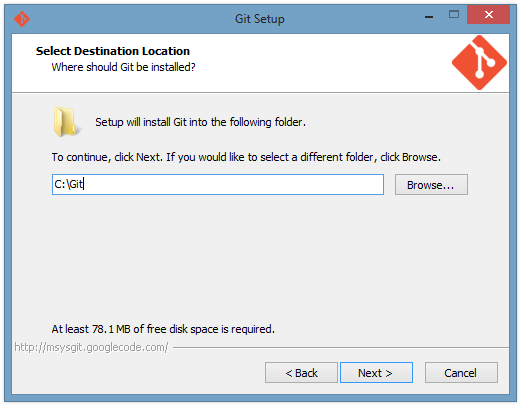
First of all, I like to install git in C:\git instead of in "Program Files" so that the path has no spaces. Git comes with lots of Unix utilities such as diff and grep. Lots of Unix utilities were developed in an environment where it was highly unusual for a path to have spaces in it. As a result, when these utilities are ported to Windows, some of them have trouble when they encounter spaces in a path. I am not saying that the utilities included with Git necessarily have this problem, but maybe some other Unix utilities on your computer will get screwed up by the presence of the Git Unix utilities on the path. This is not just an academic concern: it actually happened to me and caused problems for our customers. See this bug report I filed to the GNU make maintainers. On the other hand, you should install Git in the default location if you plan on redistributing any Unix utilities to your customers; it's better that you should be the first person to experience the bugs in those utilities, rather than your customers.
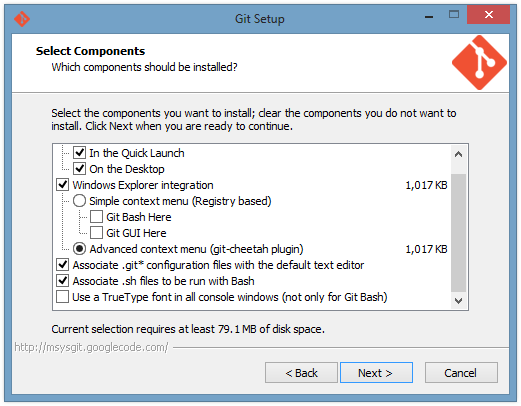
I mostly just installed the default components of git, except that I chose the fancy git-cheetah plugin instead of the simple menus. This means that when I right-click on a folder or file in Windows, I will see some git commands available in the menu, and there will be different commands depending on whether I am in a git repository or not.
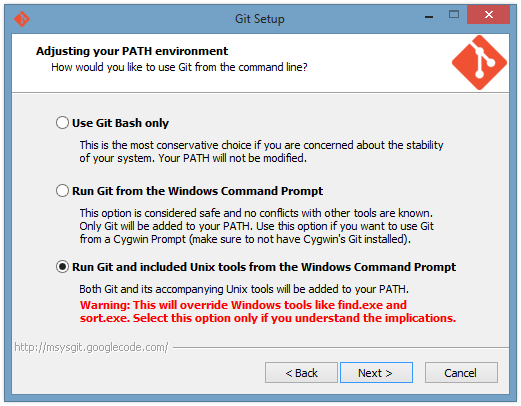
Git gives you three options for how it will adjust your PATH environment variable. The PATH is a list of directories that contain executables you might want to run from a command line. I chose the third option, which is the most invasive, because I occasionally need to use the plain old Command Prompt (instead of Git Bash), and when I do that I want to have access to useful utilities like grep and GNU find. I have not tested this option for very long though, so if you want to be careful you should pick the middle option. (Just because the middle option mentions cygwin it doesn't mean you have to use cygwin.)
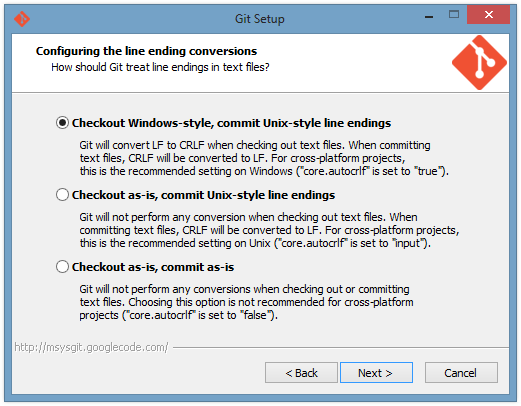
I think the options on the line-ending conversion setup screen above are pretty self-explanatory. You just need to understand that there is this long history of Windows applications using two bytes (0x0D, 0x0A) to indicate a new line in ASCII text, while Unix applications use just one byte (0x0A). I always chose the first option and it has not caused me any problems.
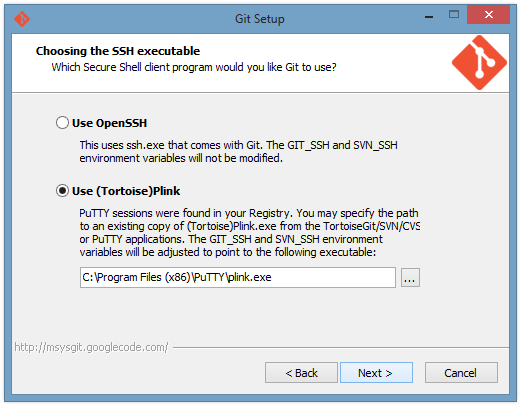
Git can establish secure connections to remote git repositories using SSH. The git client thankfully does not implement all the details of SSH key management and profile configuration; instead it lets you choose another program to do that work. The default option is to use the version of OpenSSH (ssh.exe) that comes with Git. I choose the other option, which is to use PLink. I will talk more about this below.

After installing Git, you should configure what editor you want to use for commit messages. I usually specify commit messages on the command line with the -m option, but sometimes I just need to use an editor. For example, if you want to write a very long commit message or you want to amend a commit without changing the message, the editor is pretty useful. I like Notepad++, so I just run the following command to configure git to use Notepad++. The -alwaysOnTop option is used so that I do not get too distracted in the middle of writing my commit message!

git config --global core.editor "'C:/Program Files (x86)/Notepad++/notepad++.exe' -multiInst -notabbar -nosession -noPlugin -alwaysOnTop"

Exploring Git Gui

If you are going to spend a lot of time with git, I recommend using Git Bash and being familiar with the command-line options for Git. It will help in the long run. However, you might also find it useful to use the included GUI. Here is the context menu you get when you right-click on a file or folder in a git repository, thanks to the git-cheetah plugin:
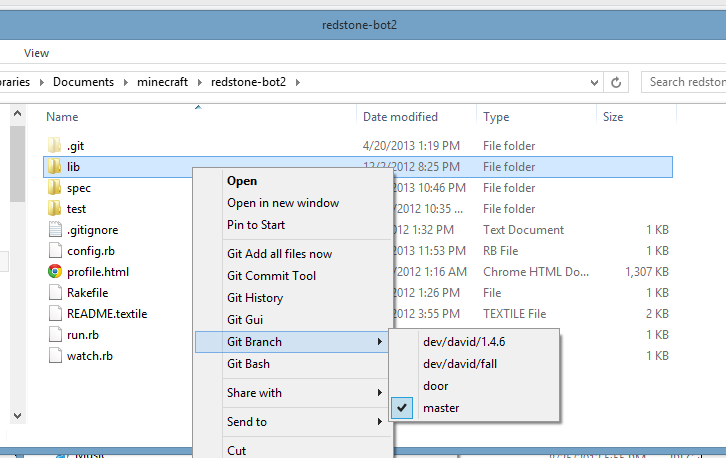
The only difference between the Git Commit Tool and the Git Gui is that the commit tool closes after you make a commit, and it has a lot fewer features because it just for making commits. Besides the context menu, you can also access either tool from the command line by typing git gui or git citool. This is what the Git Gui looks like:

[picture]

Here is what the Git History screen looks like. I did some editing so you can see three of the right-click context menus that are available on this screen:

[picture]

Git Gui versus TortoiseGit

There are many options for GUIs to use with git. I have used TortoiseGit (and Tortoise SVN before that) for many years. TortoiseGit does have a very nice interface for showing the history of your git repository, but I find that interface to be buggy and slow at times. If you change one of the checkboxes at the bottom while the window is open, is it not uncommon for that operation to take 5-15 seconds. When that operation is done, it is not uncommon for the lines drawn between the commits to be incorrect.

TortoiseGit does have a nice shell extension for Windows that puts icon overlays on your files to indicate which ones have changed in git. However, I cannot trust those icons anymore because they have too often been incorrect in my experience. For example, I will see that some folder has a red icon indicating that it has changed, but then I run "git diff" and see that in fact nothing has changed. On top of that, I have occasionally experienced even weirder problems in Windows Explorer that I suspect might be the fault of TortoiseGit.

TortoiseGit and Git Gui have a different approach to UI design. In TortoiseGit, the center of your experience will be a really long sub-menu of right-click context menu. It contains about 25 different operations you might want to perform. Actually, I move the most-common operations up one level in the menu structure so I don't have to go into that large menu too often. With Git Gui, the center of your experience will be the Git Gui window.

I have barely used Git Gui at all, but my impression is that it is faster and less buggy than TortoiseGit. Once I get used to it, I think my productivity will increase.

Side note: One downside of Git Gui is that the people who named it used the incorrect capitalization of the acronym GUI. When you write a blog post about Git Gui you might look dumb no matter which capitalization you choose to use.

How Git works with PuTTY

I find it interesting to explore how git uses PuTTY to take care of your SSH connections. Also, you might need this information some day if you are debugging your git SSH connection. Here is the block diagram of what happens when you type "git fetch":
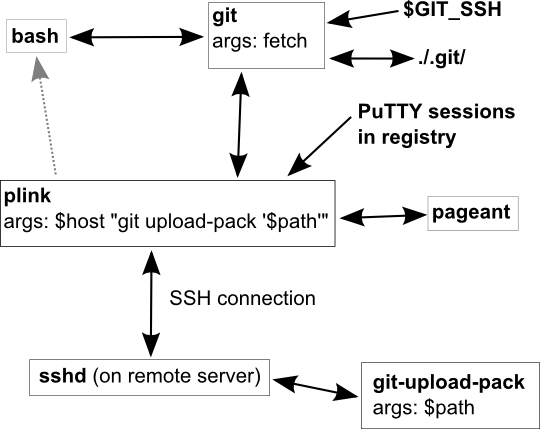
The boxes represent executable processes that are running during the fetch operation, and the arrows represent the flow of information. When you type git fetch in bash or some other shell, your shell will spawn a new git process and let you see the characters it outputs on the standard output. The git process will check the $GIT_SSH environment variable, which tells it which SSH client to use. In my case, I want $GIT_SSH to be "C:\Program Files (x86)\PuTTY\plink.exe" so that git uses the plink.exe which comes with PuTTY. Git spawns a new plink process with two arguments. The first argument is the remote host name or PuTTY session name. The second argument is a command to run on the remote machine. Git will take over the standard input and standard output of the plink process, but the error output from plink is usefully redirected to your shell. After plink establishes a connection to the remote machine, the SSH daemon (sshd) on the remote machine will run that command. (Actually, it might run it indirectly through a shell like bash.) The command will be something like "git-upload-pack '/path/to/repo'". This starts a new git process on the remote machine and tells it the path of the repository to look at. At this point there is a git process running on your machine and one running on the remote machine. They coordinate in some smart way and figure out what data needs to be fetched to your machine.

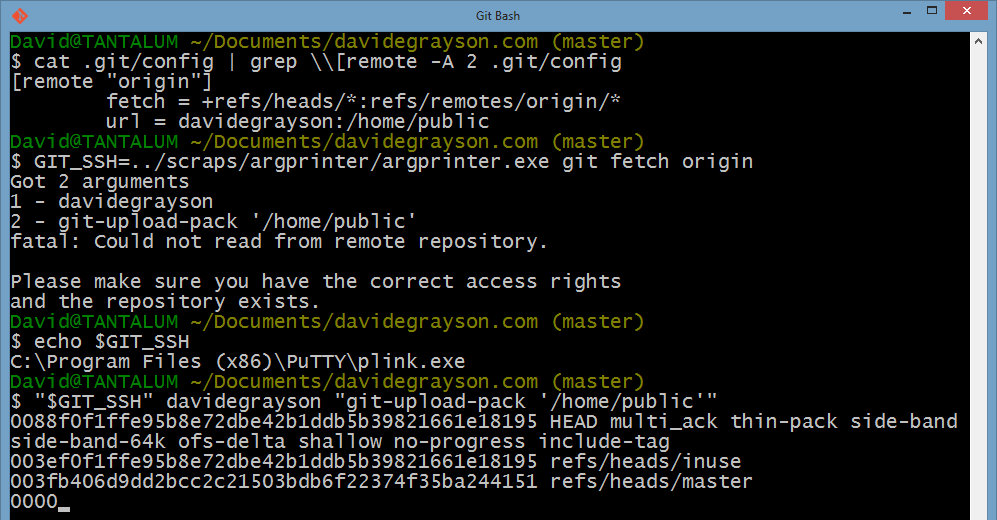
Here is a fun shell session that I used to figure out this stuff. The name "davidegrayson" is the name of a PuTTY session that establishes an SSH connection to my web server. The directory '/home/public/' holds a git repo for my website. In the last command, you can see a little sampling of the protocol that the two git processes use to talk to eachother.
This was kind of a random post but I hope you will find it useful! At least I will find it useful the next time I am installing Git in Windows!

Sunday, January 13, 2013

Ruby 2.0: Helpers should be refinements

In Ruby, people sometimes make modules called "helpers" that define some useful methods:


module MyHelper
  def add(a,b)
    a + b
  end
end

If you include the module in a class, you can call the helper methods easily without any kind of prefix:


class MyClass
  include MyHelper

  def join(str1, str2)
    add str1, str2
  end
end

puts MyClass.new.join("a", "b")   # => "ab"

However, I think this has bad semantics. Look at the output below and think about why it is bad:


puts MyClass.new.is_a?(MyHelper)  # => true
puts MyClass.new.add(4, 3)        # => 7

The fact that MyClass uses methods from MyHelper should be an internal implementation detail, but that information is leaking out to the users of MyClass in all kinds of ways.

The Ruby is_a? function returns true, telling you that an instance of MyClass is a MyHelper. However, if you design a structure like this, it is more likely that your mental model is that an instance uses the helper to accomplish its tasks without being a helper.

There are two more practical problems with this setup. First, people are free to call the helper method #add on instances of MyClass. That does not make any sense, so we should design our code to disallow that. Second, the #add method would show up in the list of methods returned by MyClass.new.methods; calling #methods in IRB is a super useful way to look for features of an unfamiliar class, and our setup makes that harder because #methods will return lots of junk. An easy way to fix these two problems is to add a new line that says private at the top of the module, but I think that is not as good as the solution I propose below.

Refinements

In Ruby 2.0, the language was expanded to include refinements. If you have not heard of refinements, Google it now. However, beware that Module#using was recently removed so nearly all of the examples you will find are wrong. You can mostly only call using from the top level of a Ruby file.

Refinements were mainly intended to make monkey-patching safer, but I believe they can also greatly improve the way we use helpers. The Object class is the parent class of (almost) every Ruby object, so if we refine it with some helper methods, those methods will be available on every object, including self. This means we can call them easily without any kind of prefix:


module MyHelper
  refine Object do
    def add(a, b)
      a + b
    end
  end
end

using MyHelper

class MyClass
  def join(str1, str2)
    add str1, str2
  end
end

puts MyClass.new.join("f", "g")      # => "fg"
puts MyClass.new.is_a?(MyHelper)     # => false
puts MyClass.new.respond_to?(:add)   # => false
puts MyClass.new.add(4, 5)   # throws NoMethodError if line
                             # is in a different file

As you can see above, by making a few easy changes to the helper and the code that uses it, we are able to fix all of the semantic problems we were having earlier. This is nice, except for one caveat which I will get to later.

Changing a helper module into a refinement

We had to add two lines of code to MyHelper to use it as a refinement. What if you do not want to edit the original module? Maybe the module is part of a third-party library or maybe you are not ready to refactor all the code that uses the module. The following works:


module MyRefinement
  refine Object do
    include MyHelper
  end
end

Generally, including a module with include is equivalent to defining some functions in the same place, and that continues to be true with refinements. This makes me happy.

Making it even better, maybe

Refining Object is troublesome because the code that uses the helper would be allowed to call helper methods on random objects. Again, this does not make sense so our code should disallow it:


44.add(4, 5)  # => 9

Maybe this is OK if you are the only one writing code that uses your helpers, but if you are writing a system or framework that involves helpers, it would be so much nicer to just refine the class that actually uses the helpers. We can do that, as shown below, but it gets a little messy because of the limitations of the Ruby language:


# This method is defined once per project.
def helper(mod, in_class: Object)
  Module.new do
    refine in_class do
      include mod
    end
  end
end

# This is a helper module.
module MyHelper
  def add(a,b)
    a + b
  end
end

# This is how you write code to use the helper module:
class MyClass; end
using helper MyHelper, in_class: MyClass

class MyClass
  def join(str1, str2)
    add str1, str2
  end
end

puts MyClass.new.join("a", "b")  # => "ab"

Unfortunately, I think this is the best we can do if we don't want to refine the Object class. If anyone—especially Ruby language designers—has an idea of how to clean this up, let me know! I will put all of my failed ideas here.

I think we are very close to having a great new use for refinements, but maybe we need a new feature or two in the language to make it feasible.

Note: refinements are experimental, and the behavior may change in future versions of Ruby! This article was based on ruby 2.0.0dev (2013-01-07 trunk 38733) [x86_64-linux], also known as ruby 2.0.0-rc1.

Monday, January 7, 2013

Practical Windows Code and Driver Signing

I recently wrote a 7000-word document that should contain everything most developers need to know about Microsoft Windows code and driver signing. You can find it on my website: Practical Windows Code and Driver Signing.

Wednesday, December 19, 2012

Fresh & Easy receipt printer test

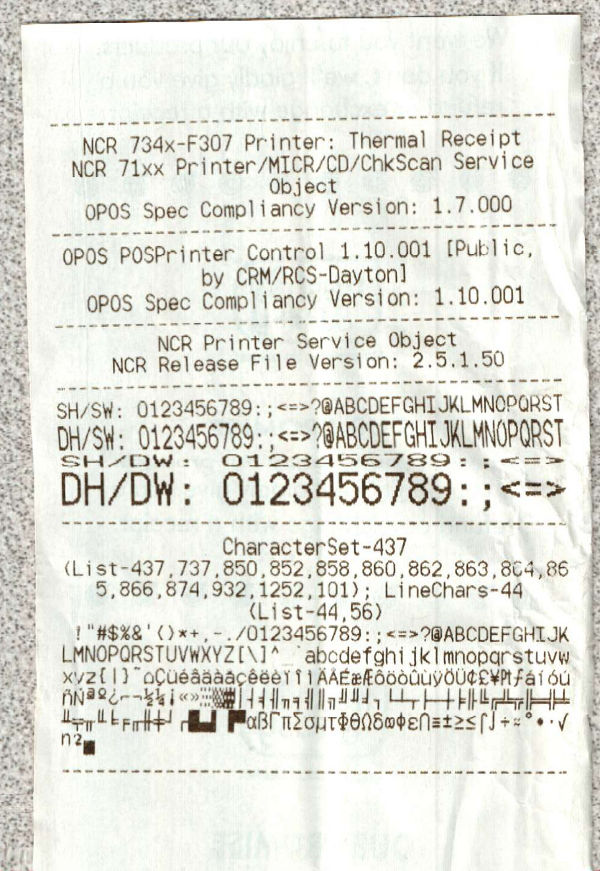
Look what I found hanging out of the receipt printer at the self-service checkout at Fresh & Easy (grocery store) the other day:

Some of the screwiness of this image is due to my handheld scanner. The actual receipt was not printed crookedly.

Here's a transcript so people can find this by searching on Google:

--------------------------------------------
   NCR 734x-F307 Printer: Thermal Receipt   
  NCR 71xx Printer/MICR/CD/ChkScan Service
                   Object
   OPOS Spec Compliancy Version: 1.7.000
--------------------------------------------
 OPOS POSPrinter Control 1.10.001 [Public,
             by CRM/RCS-Dayton]
   OPOS Spec Compliancy Version: 1.10.001
--------------------------------------------
         NCR Printer Service Object
     NCR Release File Version: 2.5.1.50
--------------------------------------------
SH/SW: 0123456789:;<=>?@ABCDEFGHIJKLMNOPQRST
DH/SW: 0123456789:;<=>?@ABCDEFGHIJKLMNOPQRST
SH/DW: 0123456789:;<=>
DH/DW: 0123456789:;<=>
--------------------------------------------
              CharacterSet-437
(List-437,737,850,852,858,860,862,863,864,86
   5,866,874,932,1252,101); LineChars-44
                (List-44,56)
 !"#$%&'()*+,-./0123456789:;<=>?@ABCDEFGHIJK
LMNOPQRSTUVWXYZ[\]^_`abcdefghijklmnopqrstuvw
xyz{|}~

Monday, December 3, 2012

Getting git 1.8.0 to work with PuTTY/plink/pageant 0.62

I am successfully running the following things together:

  • Windows 8
  • Git-1.8.0-preview20121022.exe from here
  • PuTTY, plink, and pageant, all version 0.62, from here

I'm not sure if the Startup menu exists any more in Windows 8. To make pageant.exe run at startup and load my key, I used regedit to add a registry value under HKEY_CURRENT_USER\Software\Microsoft\Windows\CurrentVersion\Run. The value is a String, the name can be whatever, and the value should be something like:

"C:\Program Files (x86)\PuTTY\pageant.exe" "C:\your\private\key.ppk"

By default, the version of SSH that ships with msysgit does not try to access pageant. You have to configure git to use plink.exe instead. Lots of people on the internet will tell you that you must set the GIT_SSH environment variable to be the full path to plink.exe, but for some reason that wasn't working for me this time. I'm sure this is not optimal, but my solution was to move plink.exe to "C:\Program Files (x86)\Git\bin\ssh.exe", overwriting the original ssh.exe. (I saved a copy of the of the original ssh.exe just in case I need it later.)

Anyway, it works now so I can continue working on all of my favorite coding projects.

UPDATE: See my new and improved article entitled Git and PuTTY in Windows.